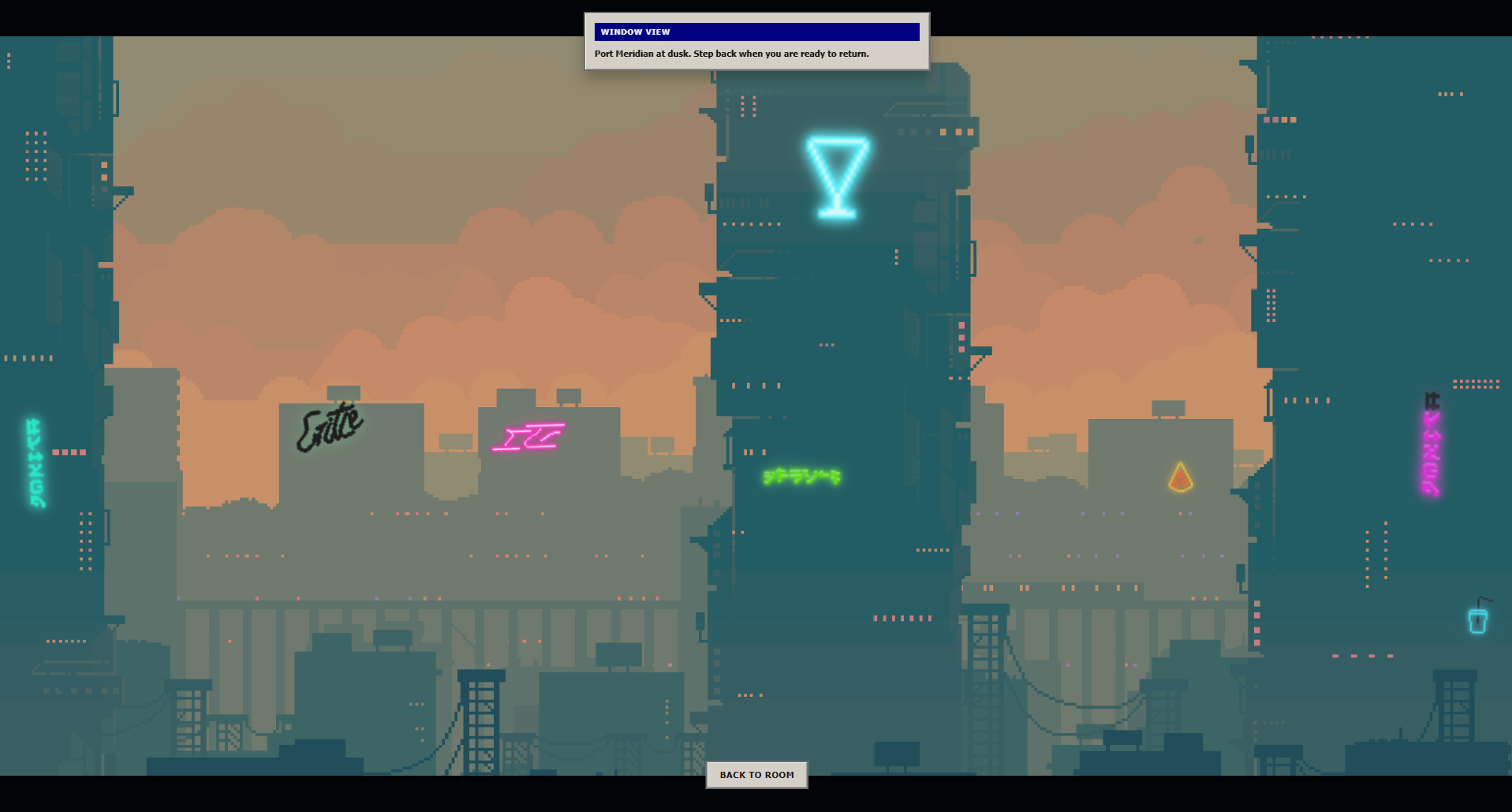
The Challenge: A Fragmented City Experience
Over the past week, CodeGrind’s dev branch saw 41 commits and 10 merged pull requests focused on a single, critical refactor: rebuilding the city mode. This recent batch of updates focused on improving the city experience for our users by increasing immersion with the implementation of the phaser.js game engine, improving navigation and state management, and enhancing mobile resilience. The city mode is the heart of our onboarding experience, and it had become increasingly clear that the old implementation was struggling to keep up with our vision for a seamless, engaging user experience. This is the story of how we fixed it.
What Broke, and Why
The city mode is CodeGrind’s hub for onboarding and world exploration. It’s where new players see their apartment, meet NPCs, and decide what to learn next. But the old implementation had several architectural debt points:
- Route detection wasn’t standalone – The city mode depended on implicit parent context to know when it was active.
- Mobile shell visibility was tangled – Show/hide logic lived in multiple places with conflicting conditions.
- Viewport sizing was rigid – Container dimensions weren’t responsive to actual available space.
- Asset loading was synchronous – Backdrops and apartment previews blocked the render pipeline.
- State wasn’t recoverable – Fullscreen toggles, chat status, and navigation context could get out of sync on mobile. and most critically:
- Bad Visual Experience - The City mode left much to be desired visually. There was no real game engine, just some crude engineering to give a bad experience that was not the intended vision. The backdrop would load after the apartment, and mobile users would often see a blank screen.
Each issue alone was manageable. Together, they created a cascade of bugs and poor user experiences: players on mobile would see a blank screen, city navigation would fail after a refresh, all while experiencing a visually unpleasing environment.
The Solution: Four Key Refactors and an Engine Upgrade
0. The Phaser.js Engine Upgrade
The most significant change was the introduction of the Phaser.js game engine to power the city mode. This allowed us to create a more immersive and visually appealing environment for players, with smoother animations and better performance. The engine upgrade also provided a solid foundation for future enhancements, such as interactive NPCs (working on improving) and dynamic environments (to be added in soon).
We also implemented a new renderer transition system that allows for seamless switching between the city mode game engine and the regular site in both directions. This means that players can now enjoy a more cohesive visual experience without jarring transitions or out of touch loading screens.
This also included a complete overhaul of the asset loading system, allowing for asynchronous loading of backdrops and apartment previews, which significantly improved the visual experience and reduced load times.
1. Standalone City Route Detection
Instead of relying on parent route context, we implemented explicit route resolution:
// Before: implicit parent context if (parentRoute === ‘games’) { showCity(); }
// After: explicit detection const isCityRoute = resolveNavigationPath(currentPath);
This commit (e808d70) added detection logic that works even when the city is accessed directly via URL. Players can now bookmark /city and land safely every time.
2. Simplified Mobile Shell Visibility
We consolidated shell visibility logic into a single source of truth:
// refactor: simplify mobile shell visibility logic // Before: 3 different components checking different conditions // After: one CityShellVisibility component managing state
Commit a90462fc removed the branching logic and replaced it with a declarative state machine. The shell now knows when to hide (fullscreen game, modal open, chat expanded) without conflicting signals.
3. Responsive Viewport Sizing
The old code assumed fixed dimensions. The new implementation measures actual container size:
// feat: enhance viewport sizing logic with container size support // Commit d4f4e70 const containerSize = measureContainer(); const viewportSize = Math.min(containerSize, maxSize);
This fixed the “blank city” bug on tablets and resizable desktop windows. Tests were added to verify the math across breakpoints.
4. Fullscreen State Recovery
Commit de76f419 introduced persistent fullscreen state management:
// feat: implement fullscreen state management and recovery sessionStorage.setItem(‘cityFullscreenState’, { isActive, timestamp }); // On mount, restore the state if it’s still valid
Players can now toggle fullscreen in a game, close the browser, and return to the correct state.
Supporting Improvements
Beyond the four pillars, we refined several supporting systems:
- City backdrop caching (
ca87ecb) – Apartment preview scenes now cache backdrops asynchronously, avoiding jank. - ChatStatusBar theming (
7585c38) – Animation components now respect theme classes, preventing non retro look for chat bars. - Asset loading for production (
8ae734a) – URLs are now environment-aware; dev and production CDNs are handled correctly. - Guest-to-user migration (
9f8e6b4) – Learning node data packets are now preserved when a guest upgrades to a full account.
Why This Matters
The city mode is the first impression for new players. A broken city means:
- High bounce rate during onboarding.
- Frustration before they even write code.
- Mobile users abandoning the platform entirely.
By fixing route detection, state management, and responsive layout, we’ve made the city reliable. Players can now:
- Bookmark and return to the city reliably.
- Play fullscreen games without UI conflicts.
- Use the platform on any device without a blank screen.
- Persist their navigation state across sessions.
Takeaway: Invisible Infrastructure Wins paired with a Game Engine Upgrade
The infrastructure improvements, combined with the Phaser.js game engine upgrade, have transformed the city mode experience. Every player who lands in the city and sees a fully rendered apartment instead of a loading spinner is experiencing the result of these 10 PRs.
For developers: When your users report “it just doesn’t work,” the fix often involves refactoring the underlying architecture to be more robust and resilient. Don’t just patch symptoms—invest in the invisible infrastructure that powers the experience, especially when paired with a game engine upgrade.
Learn more about CodeGrind’s architecture and game design philosophy at codegrind.online, and track all recent changes on GitHub.